- Configuration
- Agent rules - concise, scoped CLAUDE.md files that shape agent behaviour
- Sandboxing - constrain file access and network connections
- Permissions - pre-approve safe operations, hard-block dangerous ones
- Hooks - run shell commands before/after tool calls as a safety net
- Extend knowledge and capabilities
- Skills - dynamic knowledge acquisition with progressive disclosure
- Language servers - give the agent go-to-definition, find-references, and type checking
- MCP tools - external tool servers, used sparingly
- Workflow
- Plan before acting - read-only exploration and task definition
- Embrace starting fresh sessions - keep context clean
- Template out common commands - reusable prompts for common tasks
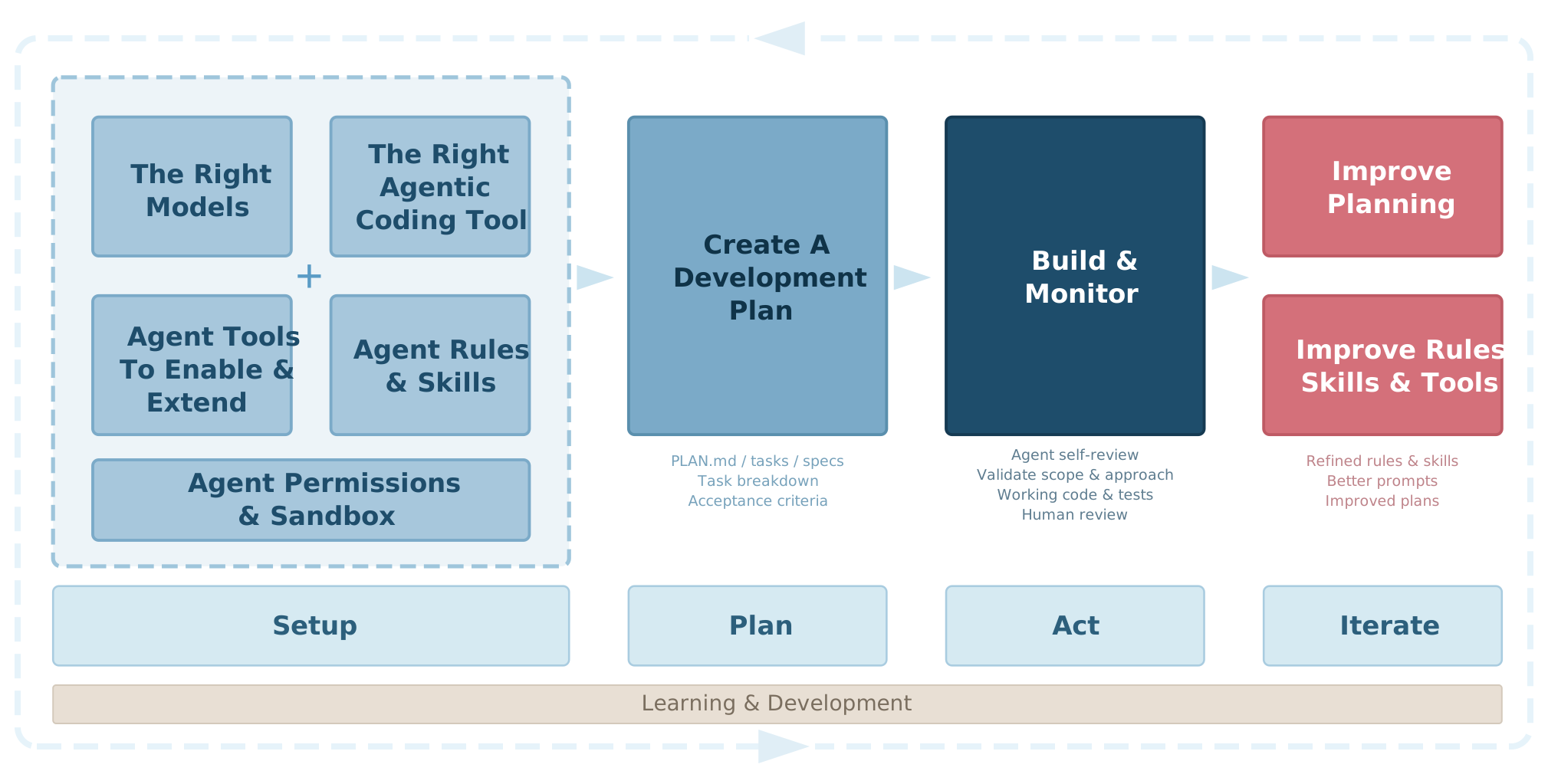
Configuration
Agent Rules
Add tight, layered rules - Claude Code loads CLAUDE.md files into context on every single message. Every line you add is tokens the model has to process and remember. Treat it like a config file, not a wiki.
Use two layers:
- Global (
~/.claude/CLAUDE.md) - things that apply to every project: language preferences, security rules, things to never do - Project (
<repo>/CLAUDE.mdor<repo>/.claude/CLAUDE.md) - repo-specific context: build commands, architecture decisions, testing patterns
~/.claude/CLAUDE.md           # always loaded, every project
<project>/CLAUDE.md           # loaded for that project only
<project>/.claude/CLAUDE.md   # alternative location (same effect)
Think about the signal-to-noise ratio. If a rule isn’t relevant to the current task, it’s just noise misleading the prediction engine. Be clear, concise and specific. Don’t blindly import someone else’s entire rule set (including mine).
Project-level CLAUDE.md files should be checked into the repo so your whole team benefits.
Remember: Rules are suggestions, not hard controls.
Enable sandboxing
Sandboxing constrains what Claude Code can read, write and connect to. It’s the single fastest way to limit the blast radius of a runaway agent.
In ~/.claude/settings.json:
{
  "sandbox": {
    "enabled": true,
    "autoAllowBashIfSandboxed": true,
    "network": {
      "allowedDomains": [
        "*.github.com",
        "*.githubusercontent.com",
        "*.npmjs.com",
        "*.pypi.org",
        "*.crates.io",
        "*.golang.org",
        "*.docker.io",
        "*.smcleod.net"
      ]
    },
    "excludedCommands": ["docker", "ssh", "uv run"]
  }
}
The network allowlist stops the agent from making unexpected outbound connections. autoAllowBashIfSandboxed means you don’t get prompted for every shell command when the sandbox is already constraining what it can do. excludedCommands lets you exempt specific commands that need network access the sandbox would otherwise block.
Note: The sandbox is not a silver bullet. Claude can actually choose not to use the Sandbox if it encounters problems with it - and somewhat idiotically there’s no way to disable this - yet.
Configure agent permissions (allow, ask, deny)
Permissions let you pre-approve safe operations (so you’re not interrupted constantly) and hard-block dangerous ones (so a confused agent can’t do real damage). The syntax is Tool(pattern *).
{
  "permissions": {
    "allow": [
      "Bash(git diff *)",
      "Bash(git status *)",
      "Bash(go *)",
      "Bash(cargo *)",
      "Edit(./**/*.go)",
      "Edit(./**/*.ts*)",
      "Edit(./**/*.py)",
      "WebFetch",
      "WebSearch"
    ],
    "deny": [
      "Bash(sudo *)",
      "Bash(git push *)",
      "Bash(rm -rf ~*)",
      "Read(~/.ssh/**)",
      "Read(**/secrets/**)"
    ],
    "ask": [
      "Bash(git add *)",
      "Bash(git commit *)",
      "Bash(rm -rf *)",
      "Bash(ssh *)",
      "Read(**/.env)"
    ]
  }
}
The deny list is your hard safety net. git push and sudo are the obvious ones. The ask list catches things that are usually fine but you want to eyeball first, like commits and destructive deletes. Everything in allow runs without prompting.
Lean into skills
Skills are an effective way of extending your agent’s knowledge. Think of them like a library where the agent can see all the book spines and pull out the relevant one whenever it encounters a situation where that knowledge would be useful. They’re simple markdown files that Claude loads into context on demand, rather than permanently like rules.
Skills live in ~/.claude/skills/ (global) and .claude/skills/ (project-level). Each skill has a SKILL.md with a name and concise description in its front matter. The agent sees all skill names and descriptions automatically and self-selects the relevant ones.
~/.claude/skills/
├── code-review/
├── go-testing/
├── shell-scripting/
├── systematic-debugging/
├── extract-wisdom/
└── ...
As well as the official skills documentation, you can see my skill creator skill (meta, I know).
Note: Never blindly install skills you find online, always review the content and any attached scripts to make sure they’re not malicious and are aligned with your goals.
- Anthropic publishes some official skills for common tasks like creating PPTX and DOCX files.
- I publish most of my skills publicly in my agentic-coding repo.
Agent Tools
Enable Language Servers (LSP)
Claude Code has a built-in LSP tool that gives the agent access to go-to-definition, find-references, hover types, and diagnostics - the same code intelligence IDEs use. With LSP enabled, the agent can navigate code structurally rather than relying on text search - jumping to definitions, finding all call sites before refactoring, and catching type errors as it works.
It’s enabled by installing code intelligence plugins from the official marketplace:
# Browse available code intelligence plugins (try searching for 'lsp')
/plugin

# Or install directly, e.g.
/plugin install typescript-lsp@claude-plugins-official
Some LSPs may also need the language servers installed for the languages you work with:
# Python
pip install python-lsp-server   # or: uvx install python-lsp-server

# Go (included with the Go toolchain)
go install golang.org/x/tools/gopls@latest

# Rust
rustup component add rust-analyzer

# TypeScript / JavaScript
pnpm install -g typescript typescript-language-server
Take a minimalist approach to MCP tools
Every MCP server you enable adds tool descriptions to the context. If you have 10 servers each exposing 5-20 tools, that’s a lot of tokens spent in every interaction just telling the model what’s available.
- If you have easy to use CLI tools (e.g.
ghfor Github) - let the agent use those instead of adding permanent MCP servers for them. - Don’t load every MCP server for every project. Use project-level
.claude/settings.jsonto scope servers to where they’re actually needed. - For 99% of tasks I only have one MCP server enabled.
Use hooks to help with safety and automation
Hooks can run shell commands before or after tool calls. PreToolUse hooks can inspect and block commands before execution which can be used as a line of defence against unexpected behavior.
- claude-code-safety-net is one I often recommend as a good starting point that aims to catch common dangerous patterns.
Workflow
Use planning mode
Planning mode (shift+tab to toggle) keeps the agent in read-only exploration mode. It can use sub-agents, read files, search code, use tools to research - but it can’t make changes until you approve its plan.
This is valuable for anything beyond a simple, targeted fix. The plan itself is an artefact you can inspect and refine with Claude, when you’re ready Claude will offer to start a fresh session to act upon the plan.
TLDR: plan first, act second, iterate.
Embrace starting fresh sessions
LLMs are stateless. Every message you send includes the full conversation history. As a session gets longer, the model has more to process; it slows down and output quality degrades.
Embrace starting fresh sessions, operating from a plan allows you to do this without losing where you’re up to.
Create commands (or skills) for frequent prompts
Create commands or skills for frequently used prompts, providing you quick access via /command-name.
Here’s my most-used one, /self-review that I run after Claude completes multiple tasks:
---
description: Conduct a critical self-review of your changes & fix any errors
---

Please conduct a critical self-review of your changes, check for
any errors or changes you missed, correct any errors you may find.
Most of the rules, skills, hooks and commands I use are in my agentic-coding repo. Take what’s useful, ignore the rest.