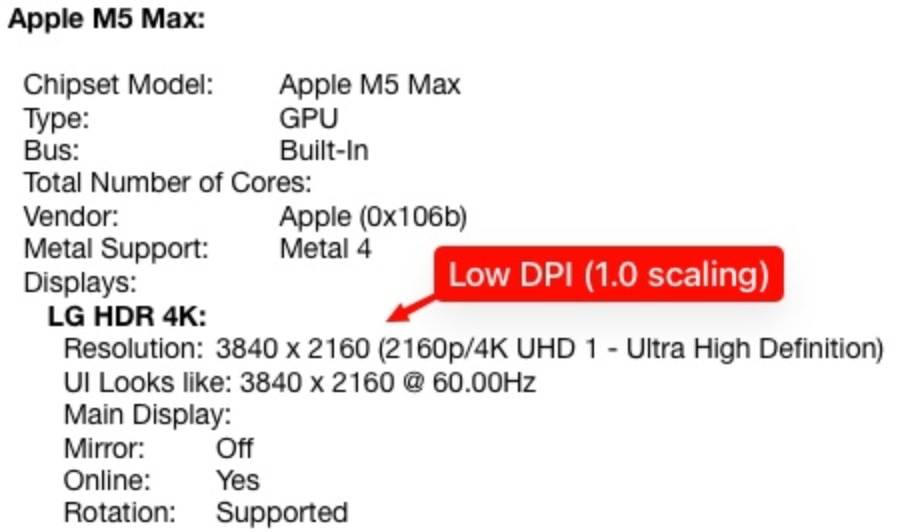
Starting with the M4 and including the new M5 generations of Apple Silicon, macOS no longer offers or allows full-resolution HiDPI 4k modes for external displays.
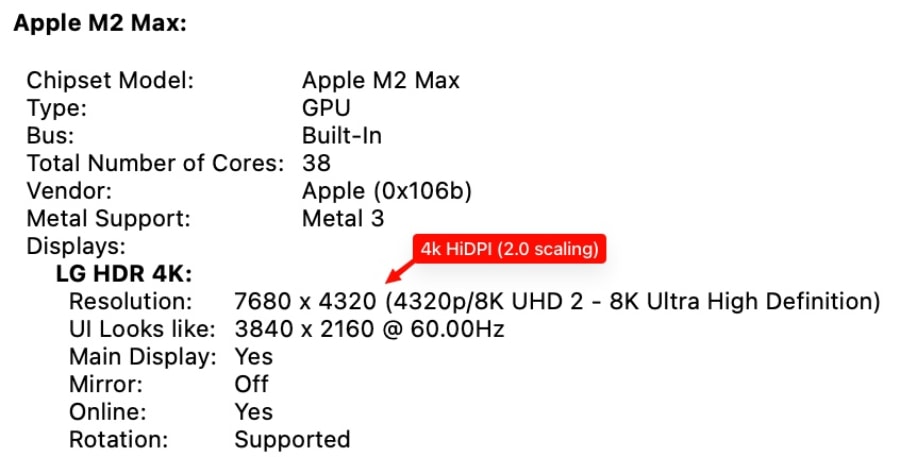
The maximum HiDPI mode available on a 3840x2160 panel is now just 3360x1890 - M2/M3 machines did not have this limitation.
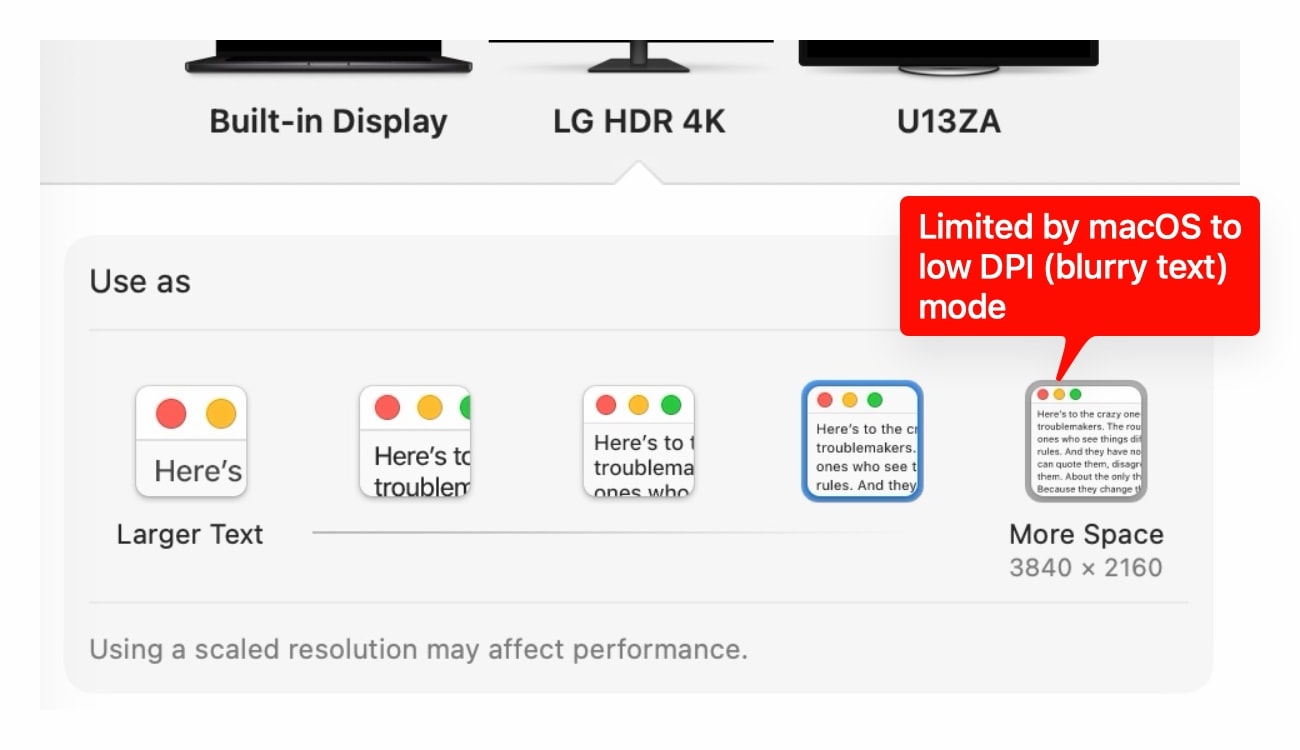
With this regression Apple is leaving users to choose between:
- Full screen real estate at 4k (3840x2160) with blurry text due to HiDPI being disabled.
or
- Reduced screen real estate at 3.3k (3360x1890) with sharp text (HiDPI) but significantly less usable working space, and macOS’s UI looking ridiculously oversized.
A regression in the display controller architecture
This is likely not a hardware limitation. The M5 Max supports 8K at 60Hz per Apple’s own specs, and its Display Coprocessor (DCP) reports identical capabilities to the M2 Max for the same display. The M4/M5 generation changed how framebuffer budgets are allocated across display pipes, and the budget for the path that standard 4K displays use dropped from 7680 pixels wide (enough for 3840x2160 HiDPI) to 6720 (only enough for 3360x1890 HiDPI). Disassembly of the DCP firmware shows the 6720 value is a hardcoded constant - the details are below.
Environment and Test Setup
| Property | M5 Max (affected) | M2 Max (working) |
|---|---|---|
| Chip | Apple M5 Max | Apple M2 Max |
| Model ID | Mac17,6 | Mac14,6 |
| GPU Cores | 40 | 38 |
| macOS | 26.4 (25E246) | 26.4 (25E246) |
| Display | LG HDR 4K 32UN880 | LG HDR 4K 32UN880 |
| Native Resolution | 3840x2160 | 3840x2160 |
| Connection | USB-C/Thunderbolt, HBR3 (8.1 Gbps), 4 lanes | USB-C/Thunderbolt, HBR3 (8.1 Gbps), 4 lanes |
| Max HiDPI Mode | 3360x1890 | 3840x2160 |
Both machines report identical DCP parameters for the LG display:
MaxActivePixelRate  = 497,664,000
MaxTotalPixelRate   = 537,600,000
MaxW                = 3840
MaxH                = 2160
MaxBpc              = 10
 |  |
Diagnosis and Troubleshooting
Display Override Plist (scale-resolutions)
What: Wrote a display override plist to /Library/Displays/Contents/Resources/Overrides/DisplayVendorID-1e6d/DisplayProductID-7750 containing scale-resolutions entries for 7680x4320 HiDPI.
Result: No effect on M5 Max. The identical plist produces 3840x2160 HiDPI on M2 Max. WindowServer on M5 Max refuses to enumerate the mode regardless of plist content.
The override plist that works on M2 Max:
<dict>
    <key>default-resolution</key>
    <data>AA8AAIhwAAAAPA==</data>  <!-- 3840x2160@60 -->
    <key>DisplayProductID</key>
    <integer>30544</integer>
    <key>DisplayVendorID</key>
    <integer>7789</integer>
    <key>scale-resolutions</key>
    <array>
        <data>AAAeAAAAEOAAAAAJACAAAA==</data>  <!-- 7680x4320 HiDPI -->
        <data>AAAeAAAAEOA=</data>               <!-- 7680x4320 -->
        <data>AAAPAAAACHA=</data>               <!-- 3840x2160 -->
    </array>
</dict>
EDID Patching (Software Override)
What: Wrote a patched EDID into the override plist’s IODisplayEDID key with:
- Preferred timing doubled to 4095x4095 (12-bit EDID field maximum)
- Pixel clock set to maximum (655.35 MHz)
- Range limits boosted to 2550 MHz max pixel clock, 255 kHz max H-freq, 255 Hz max V-freq
Result: No effect with these values. However, waydabber (BetterDisplay developer) has confirmed that software EDID overrides did work for him on M4 in the past - he got an 8K framebuffer on a 4K TV by adding a valid 8K timing and defining it as the native resolution. The catch: a 4K panel can’t actually accept an 8K signal, so this confirms the mechanism (scaled modes derive from the system’s idea of native resolution) without providing a practical fix.
EDID Hardware Flash - VIC 199 (8K) and DisplayID Extension
What: Created a patched EDID with VIC 199 (7680x4320@60Hz) added to the CEA Video Data Block, keeping the preferred detailed timing at 3840x2160. Successfully flashed to the LG monitor’s EEPROM via BetterDisplay.
Result: The DCP read VIC 199 from the hardware EDID and updated its reported capabilities: MaxW changed from 3840 to 7680, MaxH from 2160 to 4320, and MaxActivePixelRate to 1,990,656,000. The DCP also allocated 2 pipes (PipeIDs=(0,2), MaxPipes=2) as it would for a real 8K display. However, the sub-pipe 0 framebuffer budget (MaxSrcRectWidthForPipe) remained at 6720, and no 3840x2160 HiDPI mode appeared.
A further attempt added a DisplayID Type I Detailed Timing for 7680x4320@30Hz marked as preferred and native. This did generate a 3840x2160 scale=2.0 mode in the CG mode list. However, when selected, macOS attempted to output 7680x4320 on the wire (since the EDID declared it as a supported output mode), which the LG could not display. A DisplayID Display Parameters block (declaring 7680x4320 as native pixel format without creating an output timing) did not generate any new modes.
EDID Flash to Monitor EEPROM (Range Limits Only)
What: Created a patched EDID binary with boosted range limits only (keeping preferred timing at native 3840x2160 to avoid breaking display output), attempted to flash to the LG monitor’s EEPROM via BetterDisplay’s “Upload EDID” feature.
Result: The range-limits-only flash did not change any DCP parameters. The DCP derives MaxActivePixelRate from the preferred timing’s pixel clock, not from the range limits. A subsequent flash with VIC 199 added to the Video Data Block was successful (see “EDID Hardware Flash” section above).
IOKit Registry Override (DisplayHints)
What: Attempted to modify the DCP’s DisplayHints dictionary and ConnectionMapping array directly in the IOKit registry using IORegistryEntrySetCFProperty, targeting higher MaxW, MaxH, and MaxActivePixelRate values.
Result: The DCP driver explicitly rejects userspace property writes with kIOReturnUnsupported (kern_return=-536870201). These properties are owned by the kernel-level AppleDisplayCrossbar driver and cannot be modified from userspace.
Display Re-probe
What: Used IOServiceRequestProbe to trigger the DCP to re-read display information after writing override plists.
Result: No effect on mode enumeration. The DCP re-reads from the physical display, not from software overrides.
WindowServer Cache Clearing
What: Deleted ~/Library/Preferences/ByHost/com.apple.windowserver.displays.*.plist and attempted to restart WindowServer. Also performed a full reboot.
Result: killall WindowServer on macOS 26 does not actually restart WindowServer (no display flicker, no session interruption). Full reboot with the override plist in place still did not produce the 3840x2160 HiDPI mode. The cache was not the issue.
Reducing Connected Display Count
What: Disconnected the third display (U13ZA) to test whether the DCP’s bandwidth budget across display pipes was the constraint.
Result: No effect. With only 2 displays (LG + built-in), the mode list remained identical. The limitation is not related to the number of connected displays.
HDMI vs USB-C/Thunderbolt
What: Considered switching from USB-C/DisplayPort to HDMI.
Result: Not attempted; HDMI 2.0 has less bandwidth (14.4 Gbps vs 25.92 Gbps on DP 1.4 HBR3), so would be the same or worse.
SkyLight Private API (SLConfigureDisplayWithDisplayMode)
What: Used SLConfigureDisplayWithDisplayMode from the private SkyLight framework to attempt to directly apply a 3840x2160 HiDPI mode (7680x4320 pixel backing, scale=2.0) to the LG display. The mode was sourced from both the CG mode list and from other displays.
Result: Returns error code 1000 when the mode is not in the display’s own mode list. The SkyLight display configuration API validates modes against the same DCP-derived mode list as WindowServer. There is no private API path to bypass the mode list validation.
Faking Apple Display Identity
What: Tested whether the DCP firmware treats Apple-branded displays differently. Added IOGFlags = 4 (kIOGFlagAppleLook) to the LG’s display override plist, then created a patched EDID with Apple’s vendor ID (“APP” = 0x0610) and Pro Display XDR product code (0xAE21), uploaded via BetterDisplay.
Result: The display appeared as “Apple Pro Display X” in System Settings, but ExternalAppleLook remained No on all IOMobileFramebufferShim instances and MaxVideoSrcDownscalingWidth stayed at 6720. Apple displays are identified by a hardware-level handshake over Thunderbolt/DisplayPort AUX, not by EDID vendor ID.
Apple’s own displays have native resolutions where HiDPI backing stores fit within the 6720 budget anyway (Pro Display XDR: 6016x3384, Studio Display: 5120x2880), so ExternalAppleLook may not even affect scaler budgets.
Comprehensive IOKit Write Attempts
Every available IOKit API and service was tested for writing MaxVideoSrcDownscalingWidth and IOMFBMaxSrcPixels:
| Service | Method | Result |
|---|---|---|
| IOMobileFramebufferShim | IORegistryEntrySetCFProperty | kIOReturnUnsupported (no setProperties handler) |
| IOMobileFramebufferShim | IOConnectSetCFProperties (user client) | kIOReturnNotReady |
| IOMobileFramebufferShim | IOConnectCallMethod selectors 0-30 | All kIOReturnUnsupported (stub user client) |
| AppleARMIODevice (parent) | IORegistryEntrySetCFProperty | kIOReturnNotReady |
| AppleDCPLinkService | IORegistryEntrySetCFProperty | kIOReturnNotReady |
| DCPAVServiceProxy | IORegistryEntrySetCFProperty | kIOReturnNotReady |
| AppleDisplayCrossbar | IORegistryEntrySetCFProperty | kIOReturnNotReady |
| IOAVController | IORegistryEntrySetCFProperty | Accepted but does not propagate to DCP |
IOAVController is the only service that accepted property writes, but it just stores them in its own registry entry without forwarding anything to the DCP pipeline.
Where the limit is applied
The DCP reports identical capability parameters on both machines - MaxActivePixelRate, MaxW, MaxH, MaxTotalPixelRate all match. These come from the display’s EDID, so that’s expected.
The difference shows up in WindowServer’s mode list. On M2 Max, CGSGetNumberOfDisplayModes includes 3840x2160 at scale=2.0. On M5 Max, with the same DCP parameters and the same override plists, that mode doesn’t exist.
IOMFBMaxSrcPixels - the per-sub-pipe framebuffer budget
The IOMFBMaxSrcPixels property on the IOMobileFramebufferShim IOKit service exposes framebuffer size budgets. The M2 Max and M5 Max use different structures here.
M2 Max uses a flat per-controller budget:
# Each external display controller (all identical):
"IOMFBMaxSrcPixels" = {
    "MaxSrcRectWidth" = 7680,
    "MaxSrcRectTotal" = 33177600,
    ...
}
Every external display controller gets a flat MaxSrcRectWidth of 7680 and MaxSrcRectTotal of 33,177,600 (7680 x 4320). With a 7680-pixel budget, 3840x2160 HiDPI (7680x4320 backing store) fits.
M5 Max restructured to per-sub-pipe budgets within each controller:
# Each external display controller (all identical):
"IOMFBMaxSrcPixels" = {
    "MaxSrcRectHeightForPipe" = (4608, 4608, 4608, 4608),
    "MaxSrcRectWidthForPipe"  = (6720, 7680, 7680, 7680),
    "MaxSrcBufferHeight"      = 16384,
    "MaxSrcBufferWidth"       = 16384,
    "IOMFBCompressionSupport" = 1
}
The 4 values in MaxSrcRectWidthForPipe are sub-pipes within each display controller, not separate display outputs. A single-stream 4K display only uses sub-pipe 0. Sub-pipes 1-3 are for multi-pipe configurations (8K displays use 2 sub-pipes simultaneously, which is why an 8K EDID causes the DCP to assign PipeIDs=(0,2) with MaxPipes=2).
| Sub-pipe | MaxSrcRectWidth | What it’s for |
|---|---|---|
| 0 | 6720 | Single-stream output (used by all standard displays) |
| 1 | 7680 | Multi-pipe mode only (e.g. 8K displays) |
| 2 | 7680 | Multi-pipe mode only |
| 3 | 7680 | Multi-pipe mode only |
Sub-pipe 0’s budget of 6720 pixels lines up exactly with the observed cap: 3360x1890 HiDPI needs a 6720x3780 backing store. For 3840x2160 HiDPI, the backing store would need to be 7680 pixels wide. Sub-pipes 1-3 have this budget, but they’re only used in multi-pipe mode for displays that output above 4K.
| Property | M2 Max | M5 Max |
|---|---|---|
| Budget structure | Flat per controller | Per sub-pipe array |
| External controller budget | MaxSrcRectWidth = 7680 | MaxSrcRectWidthForPipe = (6720, 7680, 7680, 7680) |
| Single-stream max width | 7680 | 6720 |
MaxSrcRectTotal | 33,177,600 (7680x4320) | Not present |
| LG pipe assignment | PipeIDs=(1) | PipeIDs=(0) |
| 3840x2160 HiDPI | Yes | No |
This property is set by the kernel-level IOMobileFramebufferShim driver and can’t be modified from userspace.
MaxVideoSrcDownscalingWidth
There’s also a MaxVideoSrcDownscalingWidth property on each IOMobileFramebufferShim that controls the maximum width the video scaler will accept for HiDPI downscaling:
| Controller | MaxSrcRectWidthForPipe[0] | MaxVideoSrcDownscalingWidth | Ratio |
|---|---|---|---|
| Internal display | 5120 | 10744 | 2.1x |
| External controllers | 6720 | 6720 | 1.0x |
The internal display’s scaler runs at 2.1x its sub-pipe width. The external controllers get zero headroom - scaler budget equals sub-pipe budget. If external controllers got even a fraction of the internal display’s ratio, 3840x2160 HiDPI (7680 backing store) would fit.
The budget is fixed at boot
Testing confirmed that both MaxSrcRectWidthForPipe and MaxVideoSrcDownscalingWidth are set when the driver loads and do not change at runtime, regardless of what you do:
| Test | Sub-pipe 0 MaxSrcRectWidth | MaxVideoSrcDownscalingWidth | Changed? |
|---|---|---|---|
| LG on USB-C port 1 | 6720 | 6720 | No |
| LG on USB-C port 2 | 6720 | 6720 | No |
| LG on USB-C port 3 | 6720 | 6720 | No |
| LG on HDMI | 6720 | 6720 | No |
| U13ZA disconnected (2 displays total) | 6720 | 6720 | No |
| Clamshell mode (LG only, lid closed) | 6720 | 6720 | No |
| EDID with VIC 199 (8K) flashed to monitor | 6720 | 6720 | No |
| EDID with 4095x4095 preferred DTD | 6720 | 6720 | No |
| EDID with DisplayID 7680x4320 timing | 6720 | 6720 | No |
| Software override plist with 8K default-resolution | 6720 | 6720 | No |
| BetterDisplay native resolution set to 7680x4320 | 6720 | 6720 | No |
| 8K-only EDID (VIC 199 sole mode) | 6720 | 6720 | No (got 2 pipes but budget unchanged) |
Ghidra disassembly later confirmed these values are hardcoded constants in the DCP firmware binary, not derived from EDID or any runtime input.
What’s going on
BetterDisplay developer waydabber (discussion #4215) initially described this as dynamic resource allocation:
“Generally 3840x2160 HiDPI is not available with any M4 generation Mac on non-8K displays due to the new dynamic nature of how the system allocates resources. There might be exceptions maybe - when the system concludes that no other displays could be attached and there are resources left still for a higher resolution framebuffer. But normally the system allocates as low framebuffer size as possible, anticipating further displays to be connected and saving room for those.”
The Ghidra disassembly tells a simpler story: the sub-pipe 0 budget is a hardcoded constant (6720) in the DCP firmware, not dynamically calculated. It doesn’t change based on connected displays, EDID data, or any runtime condition. Even in clamshell mode with a single external display, the budget stays at 6720.
Putting it together:
- The DCP reports identical capabilities on M2 Max and M5 Max (same
MaxW,MaxH,MaxActivePixelRate) - The M2 Max uses a flat per-controller framebuffer budget (
MaxSrcRectWidth=7680), giving every external display enough backing store width for 3840x2160 HiDPI - The M5 Max restructured to per-sub-pipe budgets (
MaxSrcRectWidthForPipe=(6720, 7680, 7680, 7680)), where the single-stream sub-pipe (the only one a 4K display can use) is capped at 6720 - This caps the backing store width and therefore caps HiDPI at 3360x1890 on M5 Max
- Disconnecting other displays, switching ports, or closing the laptop lid doesn’t change the sub-pipe budgets
- Adding VIC 199 (8K) to the EDID changes DCP-reported MaxW/MaxH but doesn’t affect the sub-pipe budget
- Adding a DisplayID 7680x4320 timing creates a 3840x2160 scale=2.0 mode, but macOS tries to output 8K on the wire (treating it as a real output mode rather than a scaling mode), which the 4K panel can’t display
The full stack from display to application:
Physical Display (EDID/DPCD)
        |
    DCP Co-processor Firmware (t605xdcp.im4p)
    [Hardcoded constant: 0x1A40 (6720) for external sub-pipe 0]
    [Signed, runs on dedicated ARM core, not encrypted]
        |
    IOMobileFramebufferShim (kernel kext)
    [Receives values from DCP via RTKit mailbox]
    [No setProperties handler - read-only from userspace]
        |
    AppleDisplayCrossbar (kernel kext)
    [Mode generation uses MaxVideoSrcDownscalingWidth as cap]
        |
    WindowServer / SkyLight
    [CGSGetNumberOfDisplayModes enumerates only valid modes]
        |
    CoreGraphics / Applications
On M2/M3, the system generated HiDPI modes up to 2.0x the native resolution (3840x2160 native = 7680x4320 backing store). On M4/M5, sub-pipe 0’s budget of 6720 caps this at ~1.75x. The pipe budget is a hardcoded constant; the runtime scaler gate (MaxVideoSrcDownscalingWidth) is derived from hardware config that likely traces back to the same value. The architectural change from M2’s flat 7680 budget to M5’s sub-pipe model, with a smaller constant for sub-pipe 0, is what broke 4K HiDPI.
What could fix this
Apple would need to update the DCP firmware (t605xdcp.im4p and equivalents for other M4/M5 variants):
- Increase the hardcoded constant from 0x1A40 to 0x1E00 and update the hardware config register accordingly
- Allow multi-pipe for HiDPI backing stores even when the output resolution fits in a single pipe
- Make the allocation dynamic based on actually connected displays
- Expose the RuntimeProperty or boot-arg mechanism on production hardware
I’ve filed Apple Feedback FB22365722.
waydabber’s take on Apple’s position:
“Apple is certainly aware of the issue but since so far it affected a minority, the solution was to add a disclaimer to the product page about the availability of scaled resolutions, which shows some level of deliberation and a conclusion that they don’t want to change things just yet.”
A 5K or 8K panel may not hit the exact same limit since its EDID native resolution is high enough that 1.75x scaling still provides a usable backing store.
Appendix: Diagnostic Commands and Output
Commands to reproduce this on any Mac. All except #3 work without special permissions. Command #6 is the most useful single diagnostic for this issue.
Diagnostic commands
# 1. DCP rate limits and native caps per display
ioreg -l -w0 | grep -o '"MaxActivePixelRate"=[0-9]*\|"MaxW"=[0-9]*\|"MaxH"=[0-9]*' \
  | paste - - - | sort -u

# 2. System profiler display summary
system_profiler SPDisplaysDataType

# 3. All HiDPI modes for a display (requires Screen Recording permission)
#    Use BetterDisplay, SwitchResX, or any tool that calls
#    CGSGetNumberOfDisplayModes / CGSGetDisplayModeDescriptionOfLength.
#    Example output format shown below.

# 4. Display connection details and DisplayHints
ioreg -l -w0 | grep -B5 -A2 'MaxActivePixelRate' | grep -v EventLog

# 5. ConnectionMapping (per-pipe allocation)
ioreg -l -w0 | grep "ConnectionMapping"

# 6. Per-pipe framebuffer budgets (the key constraint on M4/M5)
ioreg -l -w0 | grep "IOMFBMaxSrcPixels"

# 7. Video scaler downscaling width cap per controller
ioreg -l -w0 | grep "MaxVideoSrcDownscalingWidth"
M2 Max (Mac14,6) - Working
Display: LG HDR 4K 32UN880 (3840x2160) via USB-C/Thunderbolt, macOS 26.4.
Note: Commands 2, 4, 5 were captured without the LG connected. The mode list (command 3) was captured with the LG connected in a separate session.
Command 1 - DCP rate limits:
"MaxW"=3840     "MaxActivePixelRate"=497664000  "MaxH"=2160
"MaxW"=3840     "MaxActivePixelRate"=552950718  "MaxH"=2400
Command 2 - System profiler (LG not connected at capture time):
Graphics/Displays:

    Apple M2 Max:

      Chipset Model: Apple M2 Max
      Type: GPU
      Bus: Built-In
      Total Number of Cores: 38
      Vendor: Apple (0x106b)
      Metal Support: Metal 4
      Displays:
        Color LCD:
          Display Type: Built-in Liquid Retina XDR Display
          Resolution: 3456 x 2234 Retina
          Main Display: Yes
          Mirror: Off
          Online: Yes
          Automatically Adjust Brightness: No
          Connection Type: Internal
Command 3 - HiDPI modes (LG connected, top 5):
mode: {resolution=3840x2160, scale = 2.0, freq = 60, bits/pixel = 16}
mode: {resolution=3840x2160, scale = 2.0, freq = 30, bits/pixel = 16}
mode: {resolution=3360x1890, scale = 2.0, freq = 60, bits/pixel = 16}
mode: {resolution=3360x1890, scale = 2.0, freq = 30, bits/pixel = 16}
mode: {resolution=3200x1800, scale = 2.0, freq = 60, bits/pixel = 16}
Note: 3840x2160 at scale = 2.0 is present as the highest available HiDPI mode.
Command 4 - Display connection details (LG not connected at capture time):
DisplayHints = {}
When LG is connected, reports identical values to M5 Max:
"DisplayHints" = {
    "MaxBpc"=10,
    "EDID UUID"="1E6D5077-0000-0000-0520-0104B5462878",
    "MaxTotalPixelRate"=537600000,
    "MaxW"=3840,
    "MaxActivePixelRate"=497664000,
    "Tiled"=No,
    "ProductName"="LG HDR 4K",
    "MaxH"=2160
}
Command 5 - ConnectionMapping (LG not connected at capture time):
"ConnectionMapping" = ()
M5 Max (Mac17,6) - Affected
Display: LG HDR 4K 32UN880 (3840x2160) via USB-C/Thunderbolt, macOS 26.4.
Command 1 - DCP rate limits:
"MaxW"=3840     "MaxActivePixelRate"=497664000  "MaxH"=2160
"MaxW"=3840     "MaxActivePixelRate"=552950718  "MaxH"=2400
Identical to M2 Max.
Command 2 - System profiler:
Graphics/Displays:

    Apple M5 Max:

      Chipset Model: Apple M5 Max
      Type: GPU
      Bus: Built-In
      Total Number of Cores: 40
      Vendor: Apple (0x106b)
      Metal Support: Metal 4
      Displays:
        LG HDR 4K:
          Resolution: 6720 x 3780
          UI Looks like: 3360 x 1890 @ 60.00Hz
          Main Display: Yes
          Mirror: Off
          Online: Yes
          Rotation: Supported
        Color LCD:
          Display Type: Built-in Liquid Retina XDR Display
          Resolution: 3456 x 2234 Retina
          Mirror: Off
          Online: Yes
          Automatically Adjust Brightness: Yes
          Connection Type: Internal
        U13ZA:
          Resolution: 3840 x 2400 (WQUXGA)
          UI Looks like: 1920 x 1200 @ 60.00Hz
          Mirror: Off
          Online: Yes
          Rotation: Supported
Note: The LG’s backing store is 6720x3780 (3360x1890 HiDPI). This is 1.75x the native resolution, not the 2.0x (7680x4320) needed for 3840x2160 HiDPI.
Command 3 - HiDPI modes (top 5):
mode: {resolution=3360x1890, scale = 2.0, freq = 60, bits/pixel = 16}
mode: {resolution=3360x1890, scale = 2.0, freq = 30, bits/pixel = 16}
mode: {resolution=3200x1800, scale = 2.0, freq = 60, bits/pixel = 16}
mode: {resolution=3200x1800, scale = 2.0, freq = 30, bits/pixel = 16}
mode: {resolution=3008x1692, scale = 2.0, freq = 60, bits/pixel = 16}
Note: 3840x2160 at scale = 2.0 is absent. Maximum HiDPI is 3360x1890.
Command 4 - Display connection details:
"DisplayHints" = {
    "MaxBpc"=10,
    "EDID UUID"="1E6D5077-0000-0000-0520-0104B5462878",
    "MaxTotalPixelRate"=537600000,
    "MaxW"=3840,
    "MaxActivePixelRate"=497664000,
    "Tiled"=No,
    "ProductName"="LG HDR 4K",
    "MaxH"=2160
}
Identical to M2 Max.
Command 5 - ConnectionMapping:
"ConnectionMapping" = (
    {
        "MaxW"=3840,
        "MaxTotalPixelRate"=537600000,
        "MaxActivePixelRate"=497664000,
        "ProductName"="LG HDR 4K",
        "Address"="0.2.0",
        "PipeIDs"=(0),
        "MaxPipes"=1,
        "MaxH"=2160
    },
    {
        "MaxW"=3840,
        "MaxTotalPixelRate"=594000000,
        "MaxActivePixelRate"=552950718,
        "ProductName"="U13ZA",
        "Address"="0.0.1",
        "PipeIDs"=(1),
        "MaxPipes"=1,
        "MaxH"=2400
    }
)
Command 6 - IOMFBMaxSrcPixels (per-pipe framebuffer budgets):
"IOMFBMaxSrcPixels" = {
    "MaxSrcRectHeightForPipe" = (4608, 4608, 4608, 4608),
    "MaxSrcRectWidthForPipe"  = (6720, 7680, 7680, 7680),
    "MaxSrcBufferHeight"      = 16384,
    "MaxSrcBufferWidth"       = 16384,
    "IOMFBCompressionSupport" = 1
}
Sub-pipe 0 (the single-stream path all standard displays use) has a MaxSrcRectWidthForPipe of 6720, which is exactly the backing store width for 3360x1890 HiDPI. Sub-pipes 1-3 have 7680 but are only used for multi-pipe 8K configurations.
Key observation
DCP-reported capabilities are identical between M2 Max and M5 Max for the same display. The difference is in the display controller architecture: the M2 Max uses a flat per-controller budget (MaxSrcRectWidth=7680), while the M5 Max uses per-sub-pipe budgets (MaxSrcRectWidthForPipe=(6720, 7680, 7680, 7680)). The single-stream sub-pipe (the only one a 4K display uses) gets a 6720-wide budget on M5 Max, capping HiDPI at 3360x1890 before WindowServer ever builds its mode list.
Appendix: DCP Firmware Analysis
The DCP co-processor firmware is stored as an Image4 payload (im4p) on the Preboot volume at /System/Volumes/Preboot/<UUID>/restore/Firmware/dcp/. Each SoC variant has its own firmware file (e.g. t605xdcp.im4p for M5 Max). The M5 Max firmware is LZFSE-compressed (4.1MB compressed, 16.4MB decompressed) and not encrypted - extractable with img4tool:
img4tool -e t605xdcp.im4p -o t605xdcp.bin
All the IOKit property names involved in the HiDPI limit (MaxVideoSrcDownscalingWidth, MaxSrcRectWidthForPipe, IOMFBMaxSrcPixels, ExternalAppleLook, etc.) come from this firmware, not from any kext. The kexts are fully stripped and searching for 0x1A40 (6720) in them returned nothing.
The runtime enforcement function is IOMFB::UPPipe::verify_downscaling(SwapRequest *), which checks MaxVideoSrcDownscalingWidth (not the MaxSrcRectWidthForPipe array) against the requested source width. The pipe width array informs mode enumeration; the swap validation checks a separate field.
RuntimeProperty boot-args
The firmware has a runtime property system (IOMobileFramebuffer::parse_RTP_boot_args()) that suggests properties can be overridden at boot:
| RuntimeProperty | Purpose |
|---|---|
iomfb_RuntimeProperty_ExternalAppleLook | Toggle Apple display identity on external displays |
iomfb_RuntimeProperty_allocateDefaultFramebuffer | Control default framebuffer allocation |
iomfb_enable_bw_check | Enable/disable bandwidth checking |
iomfb_disable_rt_bw | Disable real-time bandwidth management |
iomfb_dual_pipe_policy | Controls dual-pipe assignment policy |
With SIP reduced and Startup Security set to Reduced Security, these were tested via sudo nvram boot-args=. iBoot passed them through to the device tree, but the DCP firmware did not act on any of them. The DCP likely receives its configuration through a separate channel, or parse_RTP_boot_args() is a development-only code path disabled on production hardware.
Disassembly
Decompiling the DCP firmware in Ghidra, the function that builds the IOMFBMaxSrcPixels dictionary (FUN_002eb62c in UPPipeDCP_H17GSCD.cpp) checks whether the display is internal or external, then assigns pipe widths from hardcoded constants:
| Constant | Hex | Decimal | Used for |
|---|---|---|---|
DAT_00001a40 | 0x1A40 | 6720 | External display sub-pipe 0 width |
0x1e00 | 0x1E00 | 7680 | External display sub-pipes 1-3 width |
DAT_00001400 | 0x1400 | 5120 | Internal display sub-pipe 0 width |
DAT_00001200 | 0x1200 | 4608 | All sub-pipe heights |
MaxVideoSrcDownscalingWidth (the runtime gate) is not a simple hardcoded literal. It’s initialised from a hardware config register or firmware config table and may be recalculated during display configuration. But on external controllers it ends up at 6720, same as MaxSrcRectWidthForPipe[0], suggesting both derive from the same source.
The limitation operates at two levels: MaxSrcRectWidthForPipe[0] (hardcoded 0x1A40) controls which modes get enumerated, and MaxVideoSrcDownscalingWidth (derived, but also 6720) is the runtime check that blocks swap requests exceeding the budget.
Why we think this is a firmware policy choice rather than a hardware constraint:
- Sub-pipes 1-3 of the same external controllers support 7680 (hardcoded 0x1E00)
- The internal display’s
MaxVideoSrcDownscalingWidthis 10744, suggesting the scaler silicon handles values well above 6720 - 8K displays work via multi-pipe, where each pipe handles 3840 width (within budget)
- 4K at 2x HiDPI (7680 backing store) falls in a gap: too wide for single-pipe at 6720, but the DCP won’t assign multi-pipe because the 3840x2160 output resolution doesn’t need it
Virtual Display Mirror Workaround (Temporary)
I wrote a small menu bar app (force-hidpi) that works around the pipe 0 budget by creating a virtual display at 7680x4320 via CoreGraphics’ CGVirtualDisplay API (a semi-public API also used by DisplayLink), then hardware-mirroring the physical 4K panel from it.
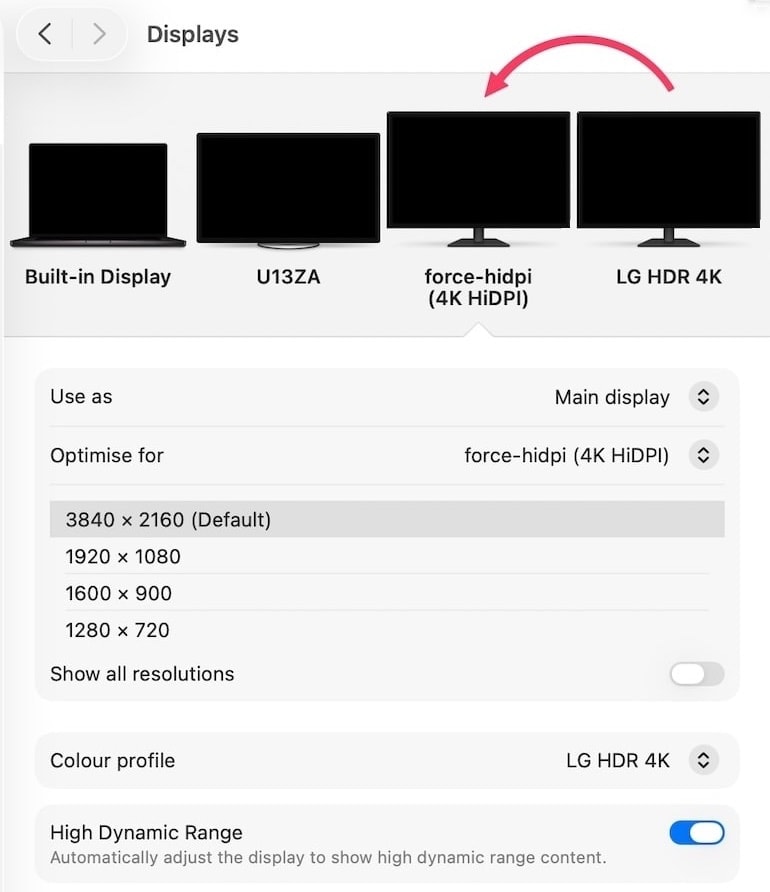
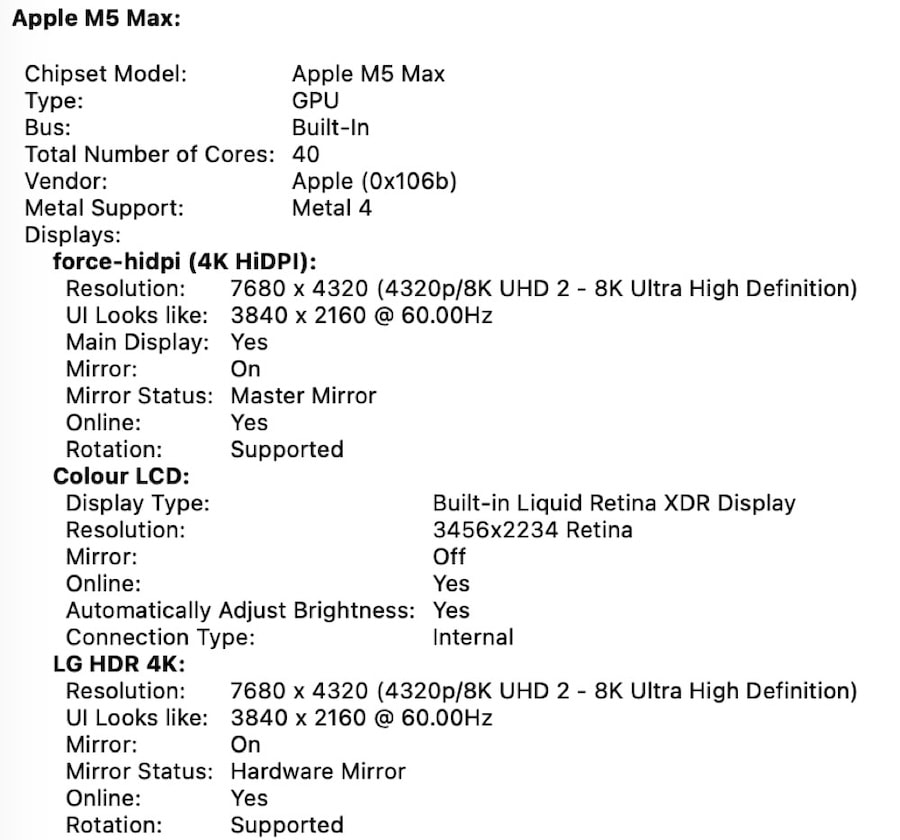
The hardware mirror path in the DCP bypasses verify_downscaling entirely - mirrored displays receive pre-composited frames from the compositor rather than direct backing store swaps through the pipe budget check. system_profiler confirms “Hardware Mirror: Yes” with the virtual display as the source.
This gets 3840x2160 HiDPI working on the physical panel. Text is measurably sharper than 1.0x scale (confirmed by more content visible at the same font size), and macOS’s UI elements render at proper 2x density. The virtual display uses PQ (ST 2084) EOTF for 16-bit/64bpp compositing, with a PQ-to-SDR gamma correction table applied so the output looks correct on SDR panels.
There are trade-offs. The app must stay running (quitting it tears down the virtual display and reverts to 1.0x). An extra “display” appears in System Settings. Text rendering is not quite identical to native HiDPI on an M2 Max driving the same panel - whether that’s the extra compositing pass or something else in the mirror path, I haven’t been able to pin down. It uses CoreGraphics’ CGVirtualDisplay API which is semi-public (used by DisplayLink and other hardware vendors) but could still break with future macOS updates.
The point is - it’s a hack, not a fix. The real solution is Apple updating the DCP firmware constant from 0x1A40 to 0x1E00.
Note: If you want an all-rounder display configuration tool for macOS consider supporting BetterDisplay.
References
- BetterDisplay Discussion #4215 - waydabber’s description of the M4-generation limitation
- MacRumors discussion
- Apple Discussions
- Apple M5 Max specifications - claims 8K (7680x4320) at 60Hz over Thunderbolt
- img4tool - used to extract DCP firmware (
t605xdcp.im4p) - Ghidra - used to disassemble the ARM64 DCP firmware binary, confirming the 6720 constant
- Apple Feedback FB22365722